
Setup guide
Start using your estimator today, without touching your website
Your estimator already has its own web address. You can start sending customers to it in the next ten minutes, long before anyone touches your website.
Every Priceguide estimator has a direct link that works on its own, with no website changes and no developer. Copy that link, put it in your Google Business Profile, your email signature and your text replies, and you can be taking estimates this afternoon. Embedding it on your site makes it better later. It is not what makes it work.
This is the single most common reason a new account goes quiet. Someone builds a good estimator, emails their web person, and waits. Three weeks later nothing has happened, no estimates have come in, and the whole thing feels like it didn't work.
It did work. It just never got shown to anybody.
Before you start
- An estimator that is built and published. If you have not built one yet, start with Build your first pricing estimator.
- Two minutes to check your prices in the Pricing Lab. Sending people to an estimator with template prices in it is worse than sending them nowhere.
- Your phone, to test the link like a customer would.
First: find and test your link
Copy your estimator link
In your dashboard, open the estimator you want to share and click Share. Copy the link. It is a normal web address on
app.priceguide.aiand it works anywhere you can paste a link.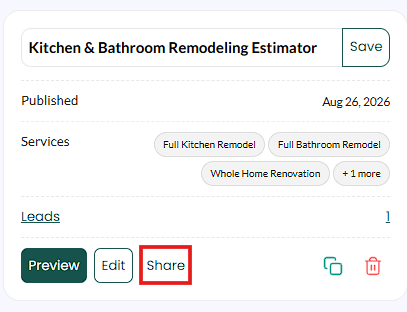
Click Share on the estimator card in your dashboard.

Then click Copy Estimator Link in the dialog that opens.
Add your logo first
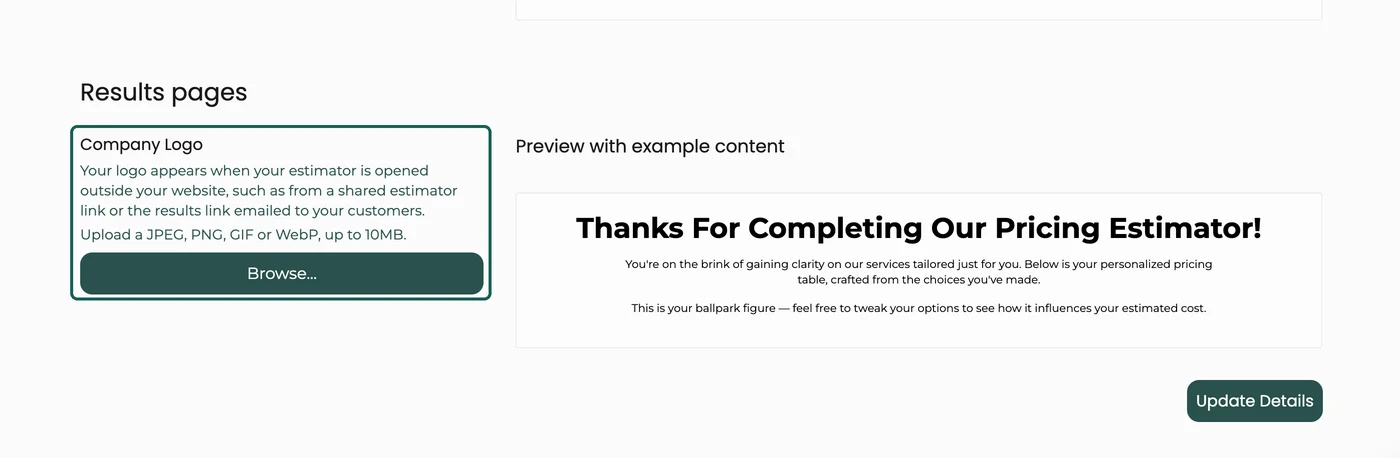
A shared link opens your estimator on its own, away from your website, so it is worth putting your logo on it. Go to Account, then Design Options, and upload it under Results pages. It shows on the estimator and on the results page your customer gets emailed. On an estimator embedded in your own website it stays hidden, so your logo never appears twice.

Results pages, at the bottom of Design Options. Open it on your phone and go all the way through
Do the whole thing as a customer. Answer every question, enter your own name and email, and look at the price you are shown at the end. Ask yourself one question: would I be happy if a customer rang me and held me to that range?
If the answer is no, fix the pricing first. It takes ten minutes now and saves an awkward conversation later.
What good looks like: the estimate that arrives in your inbox has your name on it, the prices look like your prices, and the whole thing took under two minutes to complete.
Then: nine places to put that link today
You do not need all nine. Pick the first three and you will have covered where most of your enquiries already come from.
Your Google Business Profile
This is the highest-intent free traffic any local business has. Someone searching "roof replacement near me" and clicking your profile is closer to buying than almost anyone on your website.
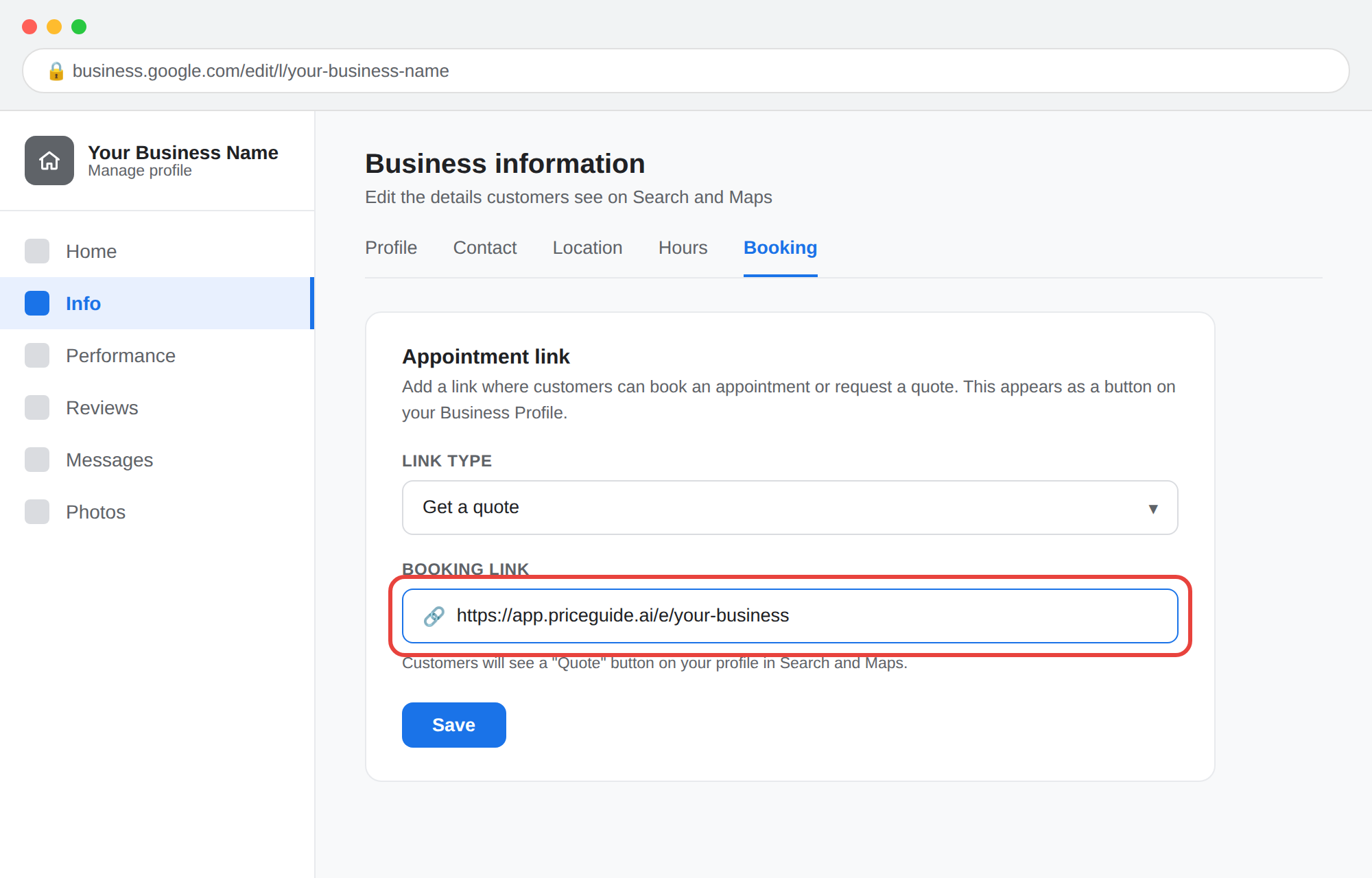
In your Google Business Profile, add your estimator link as an Appointment or Quote request link. Then publish a Post about it, and repeat that every couple of weeks.
Google post you can pasteWant a price before you call? Our online estimator gives you a realistic price range for your project in about 90 seconds. No phone call, no pushy follow-up, no waiting for a callback.
[your link]
What good looks like: the link appears as a button on your profile in Google Maps on a phone.
In your Google Business Profile, the estimator link goes in the booking or quote link field.
Every template on this page says "90 seconds". Time your own estimator first and change the number if yours takes longer. A promise you miss in the first thirty seconds is worse than no promise.
Your email signature
Set it once and it works on every email you send for the rest of the year, including all the ones you send to people who are still deciding.
Signature lineWant a price now? Get an instant estimate: [your link]
What good looks like: it is a clickable link, not plain text, and it sits under your phone number rather than buried at the bottom.Your reply to every new enquiry
When someone emails or messages asking "how much for...", send the link back straight away instead of scheduling a call. You get the answers to your qualifying questions without asking them, and they get a number while they are still interested.
Reply templateHi [name],
Thanks for getting in touch. The quickest way to get you a realistic number is our online estimator. It takes about 90 seconds and asks the same questions I would ask on the phone.
[your link]
Once you have run it, I will have your answers here and can give you a firm price. Any questions in the meantime, just reply to this.
What good looks like: you stop typing out ballpark figures by hand, and the estimate arrives in your inbox before you call them back.Text it while they are still on the phone
The strongest use of the link there is. Someone calls asking for a price, you are on a roof or in the van, and you cannot give them a proper number. Send the link before you hang up, while they still have their phone in their hand.
Text to sendGreat speaking with you. Here is our instant estimator, takes 90 seconds and gives you a real range: [your link]
What good looks like: the estimate lands in your inbox before you have finished your next job.Facebook and Instagram
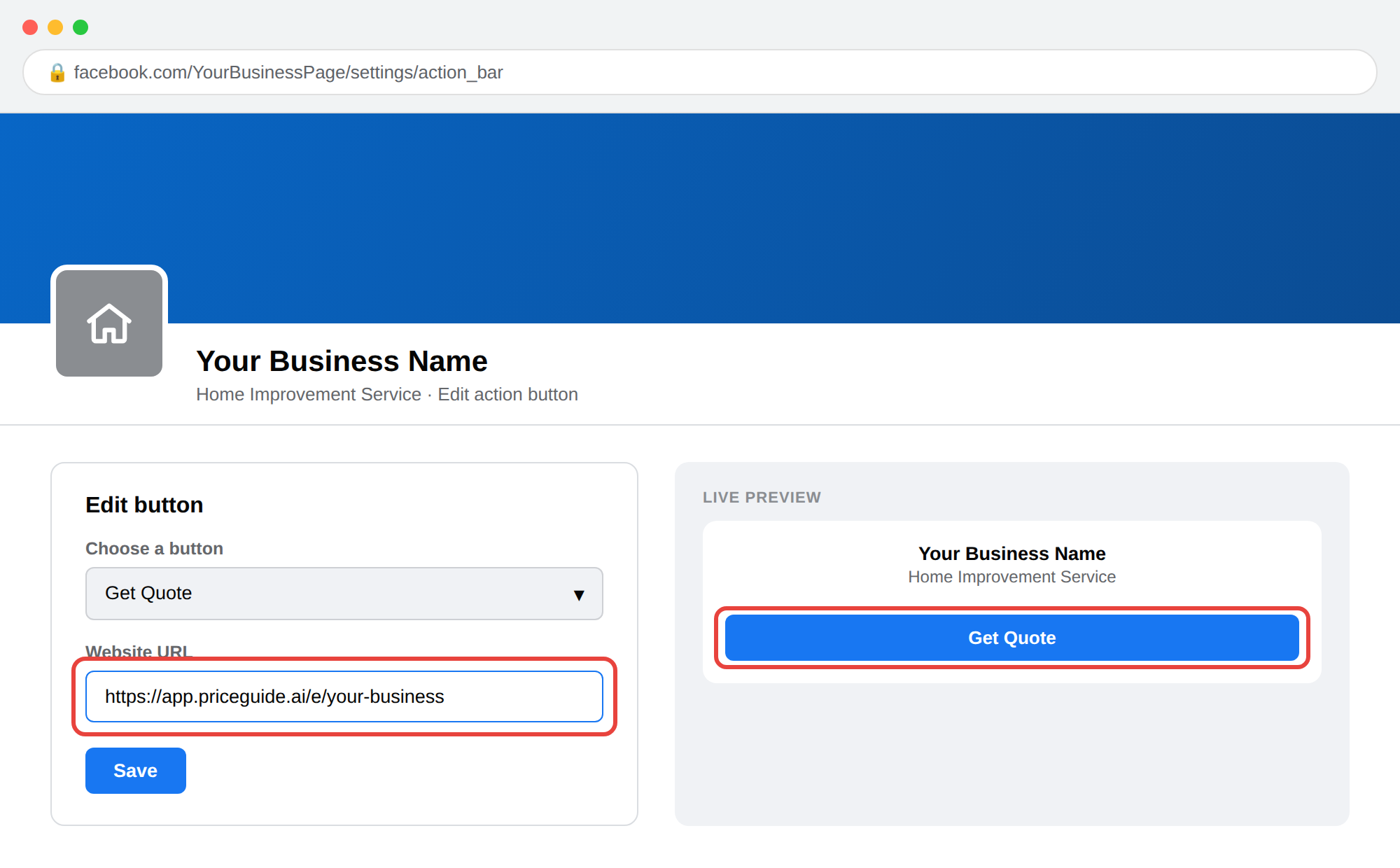
Two things here. Change your Facebook Page action button to point at the estimator, and post the link properly rather than dropping it in a comment.

Set your Page action button once and it sits at the top of your profile permanently.
Social post"How much does it cost?" is the question we get most, and the one nobody wants to give a straight answer to.
So we built a tool that does. Answer a few questions about your project and you will see a realistic price range straight away. No sales call first.
[your link]
What good looks like: comments asking follow-up questions instead of "DM for pricing".Everyone who enquired and never booked
The biggest single-day lead spike available to a new account. Every one of these people wanted a price and did not get one fast enough. Go back six months and send them all the link.
Reactivation emailSubject: A price for your [project], no phone call needed
Hi [name],
You got in touch a while back about [project]. You can now see a realistic price range for that work in about 90 seconds, without booking anything or speaking to anyone.
[your link]
If the numbers work for you, reply and we will take it from there. If not, no problem at all.
What good looks like: a handful of estimates back in the first couple of days. This is usually the quickest result a new account gets, because these people already wanted a price from you.On the call yourself
Open your own estimator while the customer is talking and fill it in as they describe the job. You get a defensible range to read back to them on the spot, and the conversation moves from "I'll get back to you" to "does that work for your budget?".
What good looks like: you are giving numbers on first contact instead of promising to call back.Before every site visit
Send the link when you book the visit. The customer arrives at the appointment already knowing roughly what the work costs, which means you spend the visit talking about the job rather than watching their face when you say the number.
Booking confirmation add-onBefore I come out, it is worth running our estimator so you have a rough idea of the range. It takes 90 seconds and saves any surprises: [your link]
What good looks like: fewer visits that end with "we'll think about it", and fewer wasted trips.A QR code on anything you already print
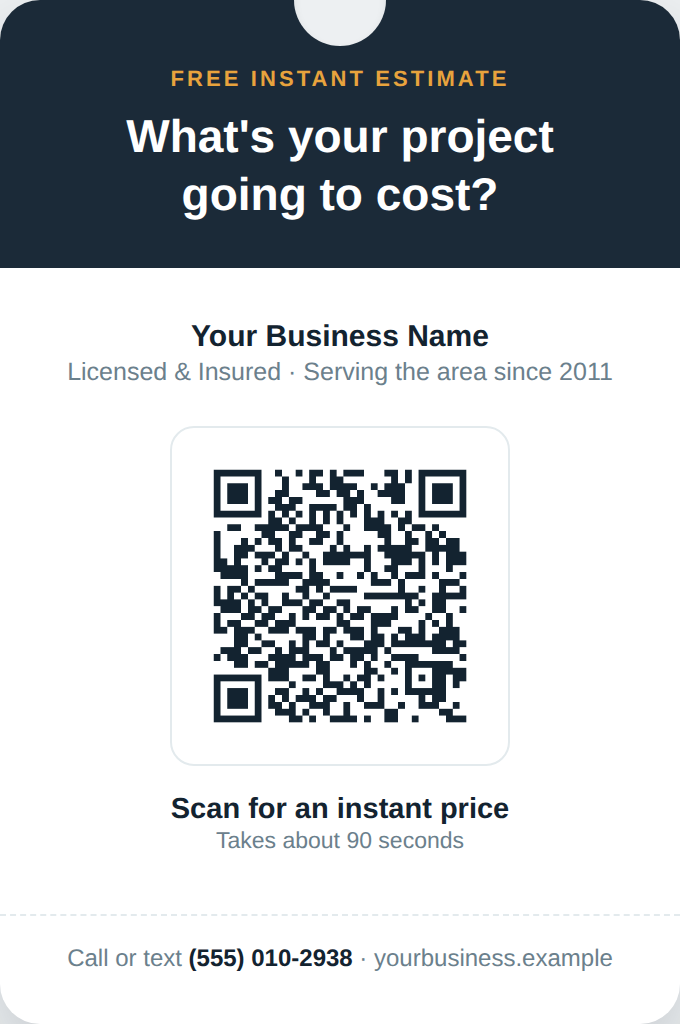
Vans, yard signs, door hangers, invoices, business cards. Generate a free QR code from your estimator link and put it on the things you are already paying to print.
Size it for the distance. A QR code scans from roughly ten times its own width. So 1 inch works on an invoice or a business card held in the hand, but a code on the side of a van that you want read from across a driveway needs to be closer to 12 inches. Getting this wrong is the most common reason a printed code never gets used.
Always put a line of text under it saying what it does. A bare QR code gets ignored.
Text to put under the codeScan for an instant price

A QR code with no text under it gets ignored. One line is enough.
What good looks like: you can scan it yourself, in daylight, from the distance someone would actually be standing, and it opens the estimator rather than an error.
Then, when you are ready, put it on your website
Everything above works without your website. But your website is where most people will look first, so it is still worth doing properly. Two things make that easy:
- Where to put your estimator, and what to call the menu link. Placement and wording matter more than most people expect.
- Request a free Agency Pack. We build a written install guide for whoever looks after your site, so you forward one email instead of trying to explain it. It is free, and you do not have to be a customer.
Troubleshooting
| What you see | What it means |
|---|---|
| "This calculator is no longer active" | The estimator is unpublished or your plan has lapsed. Check the estimator is published in your dashboard, and check your subscription is current. |
| The link works for you but not for a customer | You copied a preview or editor URL rather than the share link. Go back to the dashboard and use the Share button. |
| Estimates are completing but no email arrives | The notification address on the account is wrong, or the emails are in spam. |
| The prices shown are not your prices | You are still on template pricing. Open the Pricing Lab and set your own rates before you send the link anywhere else. |
| The QR code opens a broken page | The code was generated from a shortened or expired URL. Regenerate it from the full share link. |
Is the direct link as good as embedding it on my site?
For getting leads, yes. The estimator behaves identically. Embedding keeps people on your own domain, which is better for tracking and for the look of the thing, but it does not change how well the estimator works. Start with the link and embed when you can.
Can I use my own web address instead?
You can point a page or a redirect on your own domain at the estimator link, which is what most people do once their site is updated. The share link works on its own in the meantime.
Will Google penalise me for linking to a page on another domain?
No. Linking to a tool you use is completely normal. Once the estimator is embedded on your own site you get the added benefit of the content sitting on your domain.
How many estimates should I expect from doing this?
It depends entirely on how much traffic and how many enquiries you already get. The most reliable early result comes from emailing past enquiries, because those people already wanted a price from you.
Something not working? Email [email protected] with your estimator link and what you were trying to do.