Integration guide
Connect Priceguide to HubSpot
Add your HubSpot tracking ID to Priceguide and estimator leads are captured against your CRM automatically.
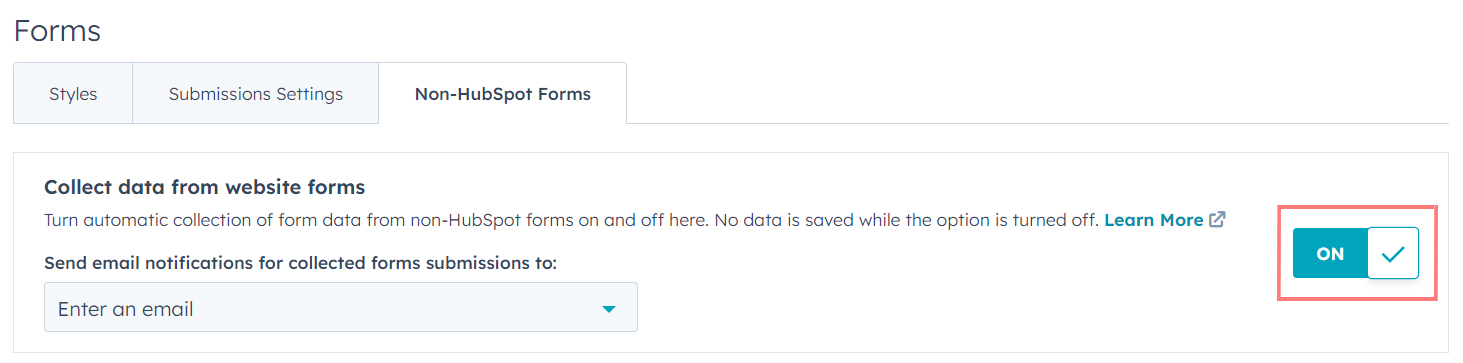
Copy your HubSpot tracking ID from Settings, paste it into the Tracking tab of your Priceguide account, and turn on non-HubSpot form collection in HubSpot. That last step is the one that makes it actually work, and it is off by default.
Open your HubSpot settings

Settings, top right. Go to Tracking Code and copy your tracking ID
Under Tracking & Analytics. It is a short number, not the whole script.

Copy the ID. Paste it into Priceguide
In your Priceguide account, open the Tracking tab and paste it into the HubSpot field.

All three tracking codes live here. Turn on non-HubSpot form collection
Back in HubSpot, enable collected forms so it captures submissions from forms it did not create.

Off by default. This is the step people miss. If you skip this, nothing happens. HubSpot ignores forms it does not own unless you explicitly tell it not to. Everything else can be right and you will still see no contacts.
Test it
Complete your own estimator with an email address not already in HubSpot, and watch for the contact.
What good looks like: a new HubSpot contact appears within a few minutes with the estimator submission recorded against it.

Tracking gives you the contact, not the detail. If you want the services they chose and the price they saw on the contact record, that needs Zapier. This is the most common follow-up question we get about HubSpot. See getting full estimate data into Zapier.
Also worth knowing
If your website is on HubSpot CMS, embedding the estimator needs the alternative embed code. See embed your estimator on HubSpot.
Troubleshooting
| What you see | What it means |
|---|---|
| No contacts appearing | Non-HubSpot form collection is off. Check that first, every time. |
| Contacts but no estimate detail | Expected. Tracking captures the contact only. |
| Duplicates | HubSpot matches on email. Test with a fresh address rather than your own. |
| Works on the direct link but not embedded | Your site's cookie consent may be blocking the HubSpot script until consent is given. |
Do I need a paid HubSpot plan?
Tracking and collected forms are available on the free CRM.
Can I map estimate answers to HubSpot properties?
Not through tracking. Use Zapier and the full data guide.
Will this work with cookie consent tools?
If your banner blocks HubSpot until consent, tracking only starts after consent. That is correct behaviour, not a fault.
Email [email protected] if contacts are not arriving.